> ## Documentation Index
> Fetch the complete documentation index at: https://docs.chatling.ai/llms.txt
> Use this file to discover all available pages before exploring further.
# Identify users across multiple chats
When you save a contact, it's associated with the user and persists across multiple chat sessions. This information can be used to personalize the conversation, skip repetitive questions, and tailor the flow accordingly.
## How it works
The [Get Contact](/chatbot/builder/blocks/action/get-contact) block can be used to fetch the contact information associated with the current user.
The example below shows a flow that identifies the user and takes different actions based on whether their contact details exist.
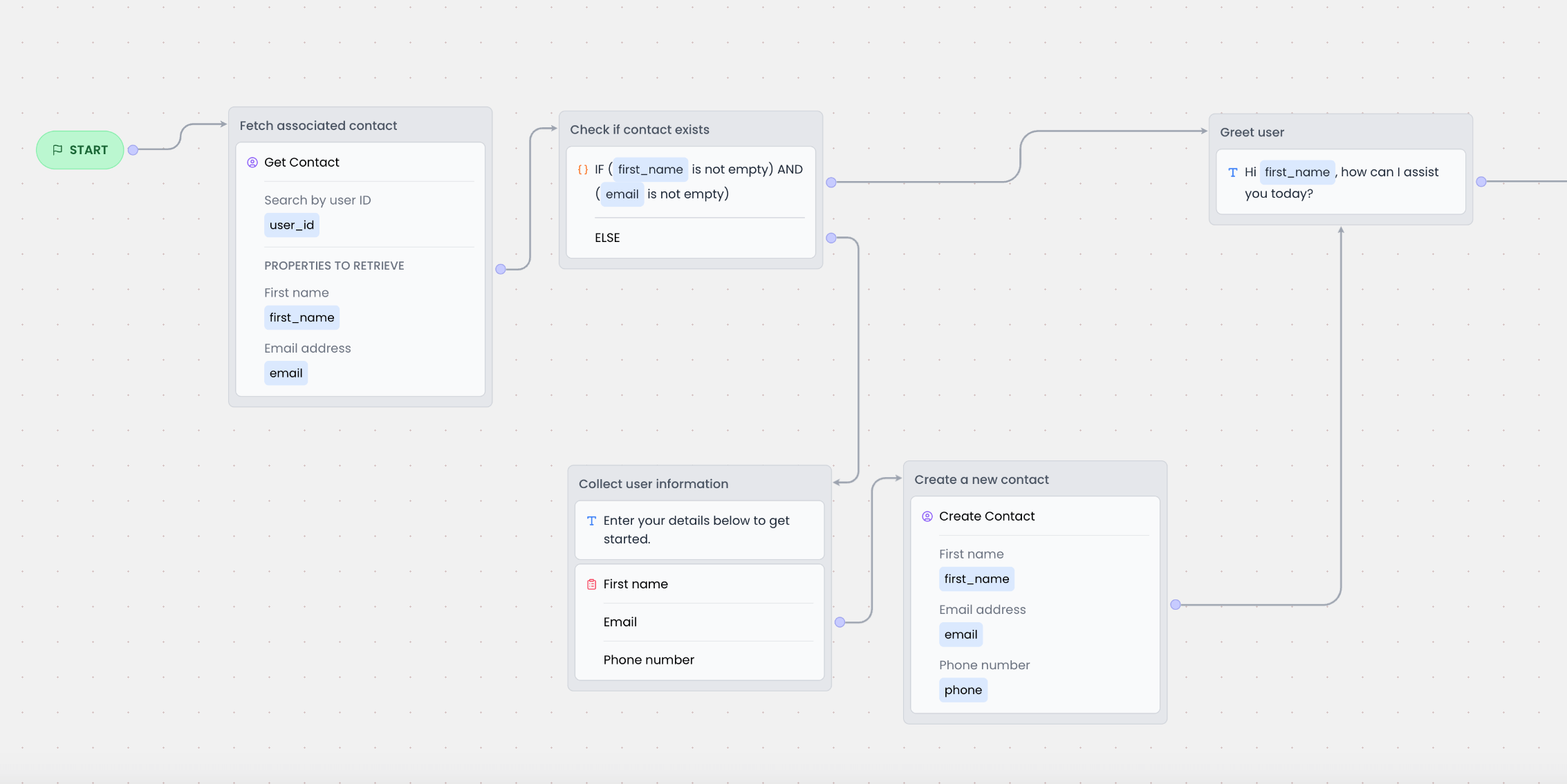 Here's how the above flow works:
1. When the chat starts, the `Get Contact` block is executed to check if a contact exists for the current user.
We're using the `user_id` variable to search for the associated contact. This is a system variable that contains the user's unique ID. If this variable doesn't exist in your builder, you can [import it from the Variables menu](/chatbot/builder/variables/import-system-variables).
2. If a contact is found, the information is stored in variables. For example, we're storing the contact's first name and email in the `first_name` and `email` variables.
3. Next, the [Variable condition block](/chatbot/builder/blocks/condition/variable) is used to check if the `email` and `first_name` variables are not empty.
* If they're not empty, it means the user is a returning user. In this case, we skip the form and greet the user by name.
* If they're empty, it means the user is new. In this case, we show the form to collect the user's name and email.
Here's how the above flow works:
1. When the chat starts, the `Get Contact` block is executed to check if a contact exists for the current user.
We're using the `user_id` variable to search for the associated contact. This is a system variable that contains the user's unique ID. If this variable doesn't exist in your builder, you can [import it from the Variables menu](/chatbot/builder/variables/import-system-variables).
2. If a contact is found, the information is stored in variables. For example, we're storing the contact's first name and email in the `first_name` and `email` variables.
3. Next, the [Variable condition block](/chatbot/builder/blocks/condition/variable) is used to check if the `email` and `first_name` variables are not empty.
* If they're not empty, it means the user is a returning user. In this case, we skip the form and greet the user by name.
* If they're empty, it means the user is new. In this case, we show the form to collect the user's name and email.